Climate & Energy

Writing on electric vehicles, the grid, decarbonization, and climate solutions.

New Temperature Sensors

New Temperature Sensors

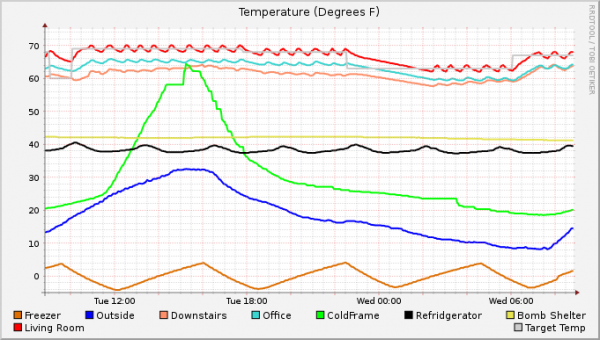
I got my self some new temperature sensors for my hacked together home thermal monitor. The software that runs this is still aweful, that's on my project list. But at least now I'm able to figure out thermal variance inside the house, which is broader than I'd have expected.

A couple other changes were made in loading in the new sensors as well.

The outdoor temperature sensor is now on the North side of the house. This should minimize the amount of the day sunlight can hit the thing. While Oregon Scientific believes it can live in direct sunlight, my experience over the last two weeks is that it definitely can not. You get a 4 - 6 degree spike under direct sunlight. I could almost use the spikes to generate a map of the trees on the south side of the house based on when their shadows hit the sensor. The short of it, my reporting to Wunderground should be more accurate now.

The cold frame sensor is still at the far edge of receptivity, especially with the amount of earth it needs to go through. I build a tin foil reflector which seems to be helping a little, but it still drops out from time to time, generating the square waves in the curve. Not much I can do about that.

If you want to know more about this project, this post is probably the best starting point.

Related: First Temperature Graphs with RRD · Weather Station Progress · Sniffing Oregon Scientific Weather Sensor Data

A Road Not Taken

In 1979, Jimmy Carter, in a visionary move, installed solar panels on the roof of the White House. This symbolic installation was taken down in 1986 during the Reagan presidency. In 1991, Unity College, an environmentally-minded centre of learning in Maine acquired the panels and later installed them on their cafeteria roof. In «A Road not Taken», Swiss artists Christina Hemauer and Roman Keller travel back in time and, following the route the solar panels took, interview those involved in the decisions regarding these panels as well as those involved in the oil crisis of the time. They also look closely at the way this initial installation presaged our own era.

This is the setup for a new documentary that's debuting at the Main Film Festival.  I'm quite interested in seeing it once it comes out.

Related: Rooftop Solar for the win · Time Travel in Film · Unity and Pidgin

Weather Channel on Android

I have to give the weather channel folks a lot of credit for their android application.  One of the quite nifty features is an alert model built into it that will actually translate national weather service alerts into phone alerts.  Today I got 2 of those.  One for the Tornado warning in the county, and the other for a very specific thunder cell moving over my location.  This is the second time that I've gotten an alert on an extremely strong thunder cell, and both times it came with a roughly 20 minute warning window.

Having my phone alert me when doom is coming is a quite good thing.  It also makes me wonder if in the future we'll have some new cellular version of the Emergency Broadcast System.  Given how few people are typically watching broadcast TV or Radio, something like this model would be quite slick.

Related: Satellite Tracking on Android · Year in Weather · I've got an Android in my pocket

Why there is Ice forming a mile down in the ocean

News reports of the failed attempt to contain the oil-spewing equipment on the bottom of the Gulf of Mexico have referred obliquely to things like "ice crystals" or an "icy slush" clogging the hardware that was intended to cap the leak. Anyone who is paying attention would recognize that there's a bit of a problem here, in that, even at the temperatures and pressures of the ocean at the site, the water there is very much in its liquid phase, as are the hydrocarbons that are spewing through the leak. The methane that caused the original explosion remains gaseous down to -161°C. The "ice" that's forming is actually a solidified mixture of methane and water called a clathrate. Clathrates have also been in the news because of a potential role in climate change, so it seems like an opportune time to explain what they are.

Ars Technica goes on to explain the chemistry of these Clathrates, and how they can exist at the bottom of the ocean.

And, on the subject of the oil breach, it's a damn shame that it's going to take the destruction of most of the marine industries in the Gulf, and large parts of the ecosystem, for people to realize off shore drilling, in both safety and trade offs, is a more complicated issue then "drill, baby, drill."

Related: The Big Picture - Oil Spill in the Gulf · A Climate Change Primer at ARS Technica · The Big Picture: Oil Spill Landfall

How to put the window buttons back to the right on Ubuntu 10.04

Ubuntu 10.04 introduces a change on the default placement of the close, minimize, and maximize buttons on windows.  This is a clone of where the Mac folks have had them over recent years, and a design that I remember originally back in Beos days.

I can understand that Mark wanted a more Mac like experience with 10.04, as Ubuntu seems looking past MS Windows parity and towards Mac OS parity at this point.  However, for those of us that are straight up Linux nuts through and through, and could give a damn about what The Steve thinks about close buttons, it's actually quite easy to put the buttons back on the right side of the window.

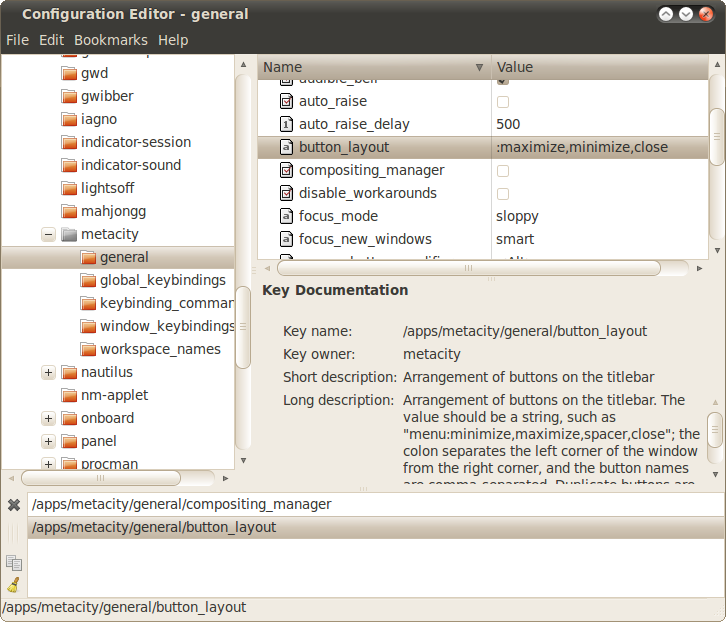
First, get to a terminal and run gconf-editor.

gconf-editor fixing window buttons in Ubuntu

Next, navigate to /apps/metacity/general/button_layout.  You just need to change this key to be ":function1,function2,function3".  If you are using the Human or Humanity themes the correct order would be ":minimize,maximize,close".  If you'd like to use the new Ambiance theme ":maximize,minimize,close" will look better, because the beveling is actually just a trick of the images, it's not intrinsic to the button area.

See, it wasn't that hard, so now people can get back to real work instead of flipping out that their buttons are in the wrong places. :)

Related: Ubuntu, not just for Linux · Ubuntu One - Cannonical's storage cloud · Switching to Ubuntu

Temperature.rb released

As I've been working on my weather station at home at nights, I realized the code would be a lot cleaner if I wasn't constantly keeping track of temperature units.  So I created the Temperature module for Ruby which adds methods to numbers to make them implicitly temperatures, as well as a parsing method on strings.  To get a flavor of it, here are some examples:

freezing_in_F = 32
freezing_in_C = freezing_in_F.to_C

boiling_in_C = 100
boiling_in_C.units = "C"
boiling_in_F = boiling_in_C.to_F

absolute_zero = "0K".to_degrees
absolute_zero_in_C = absolute_zero.to_C
absolute_zero_in_F = absolute_zero.to_F

The full documentation for the project is on rubyforge 🔗💀.  Gems, tar, and zip format have all been published 🔗💀, and it should be propagating out to the main gem servers tonight.  It's not exceptionally complicated, however it is convenient, and it's even got 236 unit tests to ensure it's doing things right.  The code is released under the MIT license, so you are pretty much able to do anything you want with it.

Related: New Temperature Sensors · Monitoring and Controlling your Proliphix thermostat with Ruby · First Temperature Graphs with RRD

Sniffing Oregon Scientific Weather Sensor Data

Sniffing Oregon Scientific Weather Sensor Data

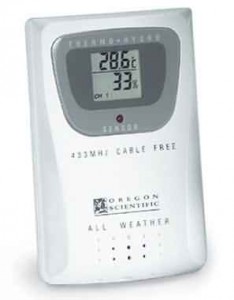
A few years ago I bought an Oregon Scientific wireless weather station.  It's a nice way to keep an eye on what's going on outside.  The unit supports up to 3 of these remote sensors (shown here), and aggregates it at a base station.  It doesn't have a computer interface, so while it displays nicely in the living room, I can't get access to that data.

Once upon a time I bought some 1-wire thermo sensors that I was going to wire that into my computer for data collection.  After the house was hit by lightning, I got far more gun shy about running conductive cables from the outside to a computer.

It occurred to me recently that there was good odds that someone must have figured out to sniff that wireless communication.  These aren't complicated devices, and Oregon Scientific seems to be letting different generations of sensors work with different generations of head units, implying that they have some pseudo standard protocol.  It would also solve my spark gap problem, as I could gather this data without any wires connected to the sensors.

After some googling I discovered that yes, these devices are operating in the 433 Mhz band, and yes, thanks to the folks at rfxcom, there is a unit out there which will receive this and spit it out in a reasonable usb interface.

Under Linux, this information can be very easily decoded with the heyu program.  This is really more of a command line system for home automation, but it also includes the rfxcom protocol and the decoders for just about everything Oregon Scientific makes.

After plugging in the rfxcom device, it took me about all of 30 minutes to get heyu compiled and configured for my devices.  The first time you run the heyu monitor you'll actually get big hex strings which are the raw data.  Once you tell heyu what kinds of sensors they are, you'll get it decoded in much more friendly units.  Here are the relevant lines in the heyu config file:

TTY	dummy
TTY_AUX  /dev/ttyUSB0  RFXCOM
ALIAS Sensor1 A1 ORE_TH1 0xB1
ALIAS Outside A2 ORE_TH1 0x83
ALIAS Sensor3 A3 ORE_TH1 0xCE
ORE_TSCALE Fahrenheit

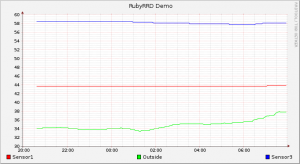
After configured and running, I now have sensor data being collected continuously:

gallifrey:~> heyu monitor
02/25 21:49:54  Monitor started
02/25 21:50:11  rcva func      oreTemp : hu A3  Ch 3 Temp 58.6F (Sensor3)
02/25 21:50:11  rcva func        oreRH : hu A3  Ch 3 RH 42% (Sensor3)
02/25 21:50:20  rcva func      oreTemp : hu A1  Ch 1 Temp 43.7F LoBat (Sensor1)
02/25 21:50:20  rcva func        oreRH : hu A1  Ch 1 RH 54% LoBat (Sensor1)
02/25 21:50:22  rcva func      oreTemp : hu A2  Ch 2 Temp 34.3F (Outside)
02/25 21:50:22  rcva func        oreRH : hu A2  Ch 2 RH 87% (Outside)

The next steps here are going to be gathering this into something that I can use for graphing.  I've now got all the sensors I was looking for to be able to build my better thermostat brain.  Next steps will be tying this all together and starting my graphing.
Related: Weather Station Progress · New Temperature Sensors · First Temperature Graphs with RRD

IPCC Debacle from the horse's mouth

There is a good posting on the Real Climate blog about the IPCC AR4 blow back that is happening.  I think this gets to the heart of it:

To those familiar with the science and the IPCC’s work, the current media discussion is in large part simply absurd and surreal. Journalists who have never even peeked into the IPCC report are now outraged that one wrong number appears on page 493 of Volume 2. We’ve met TV teams coming to film a report on the IPCC reports’ errors, who were astonished when they held one of the heavy volumes in hand, having never even seen it. They told us frankly that they had no way to make their own judgment; they could only report what they were being told about it. And there are well-organized lobby forces with proper PR skills that make sure these journalists are being told the “right” story. That explains why some media stories about what is supposedly said in the IPCC reports can easily be falsified simply by opening the report and reading. Unfortunately, as a broad-based volunteer effort with only minimal organizational structure the IPCC is not in a good position to rapidly counter misinformation.

Related: How to keep a group vibrant · What I'm listening to · Volunteer Motivations