Writings

Technology, open source, personal essays, and everything that isn't climate.

SSL everywhere

One of my new years resolutions was to put more crypto into the world. Be it because of state actors, or rogue ISPs, I think the world would be a better place with a bit more cryptography in it. As part of this, I just converted the two websites that I run, dague.net and mhvlug.org to SSL only. I'd had an SSL cert on the admin portion of dague.net for a while, but decided there was no reason to not make all traffic SSL. Getting Certs You can get certificates tons of places. I had bought a $12/yr cert for dague.net through namecheap. For mhvlug.org I used startssl, which provides free 1yr certs for individual hosts. They have a process for signing up, doing some automatic verification that you own the domain in question, and then you are off to the races. Their process is about as easy as SSL management tends to be, and there are good instructions for installing the cert into Apache. IPv4 setup SSL comes from a time when the IPv4 namespace looked small, but manageable. Before it became clear that the median # of IP addresses per human on earth would be 5 - 10. Oh how naive we were.

As such, the base protocol has no equivalent of vhosts, which means 1 hostname == 1 ip address. dague.net and mhvlug.org live on the same linode, which means I need to carry a second IPv4 address for compatibility.

In 2006 there was an approved extension to TLS call SNI (Server Name Indication), which would bring SSL to the world of vhosting. It's largely supported, however there are some substantial holdouts, including:

  • Android < 3 - there are enough Android 2 devices out there yet that I don't want to kill that off
  • Python < 3.3 - fixing this in 2.x was considered a "feature" and rejected, which means Python 2.x automation tools are directly an impediment to SSLing the web, as any python web service clients will fail unless they are on Python 3.3. (We seriously need a Python 2.8)

IPv6 setup Both of these domains are IPv6 enabled. In Apache this means you need to duplicate the SSL configuration for IPv6 as well. Oh, and you need a couple more IPs (I only had 1 on the box). Linode helpfully allocated me a /64 for my box, so now I can IPv6 to my hearts content. What stands behind us and an all SSL internet? SSL setup is a little harder than just throwing up a web server. That being said, it's not that bad. I realistically think the IPv4 shortage and the failure by thing like python to fix the issue in the version people have deployed, is a real problem. Because basically bots won't be able to find these sites, they'll fail back to the default site.

At this point I'm not going to launch anything new that's not SSL enabled. SSL should be our default as the internet community, and right now it only costs a small amount of time and an extra IP address.

Related: IPv6 no longer optional · The New Dague.Net · Python Design Patterns

Stories from Detroit

I grew up in rural Michigan, 45 minutes away from any freeway. I’m the first male member of my family in three generations never to have worked in front of a lathe, and aside from one uncle, I’m the oldest with all of my fingers intact. The university had given me some grandiose ideas like “true solidarity with the oppressed,” and I figured “the oppressed” lived in Detroit, never mind the patrimony. I thought I was making a sacrifice. I thought moving here was staying home when everyone else was leaving the state. I thought I was going to change the world and had some vague notions of starting a school. I cringe at how naive I was. I first rented an apartment in the city, sight unseen, that didn’t have a kitchen sink, so I did my dishes in the bathtub. Aside from bidding jobs, I spent my days like everyone else: sanding floors in cheap rentals for $8.50 an hour, which got me thinking: I could buy a house and fix it up myself. Not that I was sure how to go about buying, let alone renovating a house. It was just an inexplicit dream, some trick that would keep me from leaving like everyone else, make me a true Detroiter.

via Why I Bought A House In Detroit For $500.

A really interesting long read about a guy that decided to buy and fix up a house in Detroit. As we've now, as a country, expanded into all the places we can, our next century is going to be as much about rebuilding and reclaiming as anything else. This is a great micro lens for the macro picture of what that means.

Related: Neil Gaiman: How Stories Last - The Long Now · Simple thought for today · Frequently Bought Together

Thinkpad X1 Carbon - awesome Linux laptop

Note: this is in reference to the Generation 1 X1 Carbon which was available in 2012/2013. The new Gen 2 X1 Carbon has enough different hardware that this may not apply.

The Thinkpad X1 Carbon is Lenovo's stab into the ultrabook market. Made of carbon fiber (hence the name), it's very light. The last 6 months with my Samsung chromebook has made me appreciate lightness when it comes to laptops.

I'd been lusting after one of these for the last year. I decided with new job it was time to treat myself to one for my personal laptop. A great Linux machine First off, this is about the best experience I've had with a Linux machine. Everything works, and is completely rock solid. It showed up right before Christmas, I did an Ubuntu install with full disk encryption, then went about restoring my 50G home directory onto it (which takes a few hours even over ethernet).

The hardware is an i5 with Intel graphics. Over the years I had gotten so used to nvidia graphics, which are fast, but fail to suspend on about day 4. Which was typically fine, because they were work machines and Lotus Notes would crash Unity around day 3 anyway, so a restart was in order. But with Intel graphics this has been rock solid. I'm on my 3rd boot since I got it (did actually decide to take a kernel update the other day), with me suspend / resuming on average 6 times a day. Never an issue. Oh right, this is how a laptop is supposed to work. :)

Everything I've tried so far as worked fine. Displayport is fine, fingerprint reader has a pam module, which I used for about a week, then found it was requiring a few more swipes than I liked, so uninstalled it. Battery Battery life is consistently 5 - 6 hours. So my charger stays in my office, the laptop rarely does. What's even better is it's a new kind of battery tech which means it does a fast charge to 80+% in < 45 minutes. So when I'm actually down to less than an hour of battery I'll take it up to the office, and call it a break (or jump on my desktop). Keyboard The X1 carbon is the new style Thinkpad keyboard, which you'll also find in things like the T430. While it isn't the old reliable Thinkpad keyboard, I'm actually very happy with it. It has a slightly different feel, but you get used to it over time. It has nearly the same throw of the old thinkpad keyboards, not quite the same, but close. I find the feel on the individual keys is actually nicer than the old Thinkpad keyboards. The surface just feels nice.

It's still the generation that has real mouse buttons, which are actually now a think of the past, and a contributing reason to getting this versus a newer thinkpad.

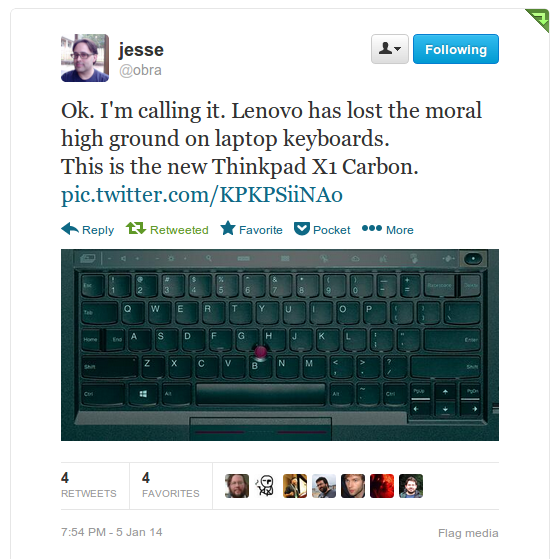
Realize, I'm about as invested in Thinkpad keyboards as anyone. My desktop keyboard is the USB Thinkpad keyboard, and I just ordered 2 more of them as backups given that it's a discontinued item. Screen 1600x900 at 14" is respectable. Importantly, it's a matte screen, which means it's usable around bright lights. It's not a great screen, especially compared to what I'm using on my desktop, however it's a comfortable one to work on. There are versions with touch screens, which would add weight and gloss, neither of which I was interested in. Slightly Older Hardware The X1 carbon came out about a year ago, so it's an i5 2 core processor. Ram is 8G max (it's soldered on, so you want to get the max). SSD maxes out at 256G. It's field replaceable, but not in a standard package, so max that out as well. In an ideal world This would have a better screen, and I could get it with speed and feed bump in the underlying hardware. That being said, I've got a nice new Haswell desktop with a ton of memory and SSD. This laptop is a joy to use, so I'm ok with slightly less speed on it. I did build a powerful workstation 6 months ago for a reason. And then Lenovo went all Crazy Pants At CES they announced a new X1 carbon. Faster processor, better screen... and a completely scrambled keyboard. No more function keys, instead a capacitive "touch region" . Caps lock removed and turned into a split home / end key. Tilda key moved over to between the right Alt & Ctrl keys. It also removes the mouse keys, which makes the touchpad non disableable. Complete crazy pants. screenshot_113 Which blows my mind. When Lenovo got the Thinkpad franchise, they got a keyboard design which was loved by millions. There were reasons why they needed to touch the keyboard once, because the old one won't fit in an ultra book. It takes up too much depth. However the level of scrambling they are doing to it now is just out of control. It makes me sad. But back to Linux... As a Linux laptop, this is a joy. This generation of X1 carbon is going to disappear soon with the big windows 8 push on their new version. So if you were ever thinking about it, now is the time to act.
Related: 30 days uptime on my Linux Laptop · To build a better Keyboard · No Coal this Christmas Season - Personal Climate Action you can take now

The NSA Bond Catalog

The National Security Agency’s sophisticated hacking operations go way beyond using software vulnerabilities to gain access to targeted systems. The agency has a catalog of tools available that would make James Bond’s Q jealous, providing NSA analysts access to just about every potential source of data about a target. In some cases, the NSA has modified the firmware of computers and network hardware—including systems shipped by Cisco, Dell, Hewlett-Packard, Huawei, and Juniper Networks—to give its operators both eyes and ears inside the offices the agency has targeted. In others, the NSA has crafted custom BIOS exploits that can survive even the reinstallation of operating systems. And in still others, the NSA has built and deployed its own USB cables at target locations—complete with spy hardware and radio transceiver packed inside.

via Your USB cable, the spy: Inside the NSA’s catalog of surveillance magic | Ars Technica.

The whole catalog is amazing, especially if you have a basic handle on embedded systems. This stuff is pretty impressive for 2008, a time before we all pocket computers always connected to the internet. I found the GSM and firmware exploits to be not very surprising. The VGA cable which taps the red signal line and transmits it over wireless was neat. Also, the code names are kind of bizarre.

I will have to say I did like it a bit better when all of this was the stuff of fiction, and not was apparently just what's happening on a Tuesday.

Related: Products for the Police State · Kids and Computers · I love that we're in an era when software can solve a hardware problem

23 and maybe me?

So I decided to read the tea leaves of my DNA. I reasoned that it was worth learning painful information if it might help me avert future illness. Like others, I turned to genetic testing, but I wondered if I could trust the nascent field to give me reliable results. In recent years, a handful of studies have found substantial variations in the risks for common diseases predicted by direct-to-consumer companies. I set out to test the tests: Could three of them agree on me? The answers were eye-opening — and I received them just as one of the companies, 23andMe, received a stern warning from the Food and Drug Administration over concerns about the accuracy of its product. At a time when the future of such companies hangs in the balance, their ability to deliver standardized results remains dubious, with far-reaching implications for consumers.

via I Had My DNA Picture Taken, With Varying Results - NYTimes.com.

I actually think a more fascinating thing to do would be to submit the same DNA to one of them 3 times under different names, and see how repeatable they are. I bet that would even be interesting.

Related: Maybe it's the other way around · NYTimes: Who owns that science data · Companies as Organisms

IPython Notebook Experiments

A week of vacation at home means some organizing, physical and logical, some spending times with friends, and some just letting your brain wander on things it wants to. One of the problems that I've been scratching my head over is having a sane basis for doing data analysis for elastic recheck, our tooling for automatically categorizing races in the OpenStack code base.

Right before I went on vacation I discovered Pandas, the python data analysis library. The online docs are quite good. However on something this dense having a great O'Reilly Book is even better. It has a bunch of really good examples working with public data sets, like census naming data. It also has very detailed background on the iPython data notebook framework, which is used for the whole book, and is frankly quite amazing. It brought back the best of my physics days using Mathematica.

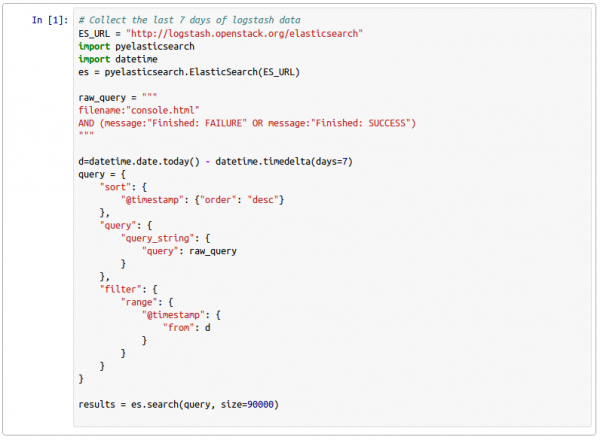
IPython notebook showing Elasticsearch data setup

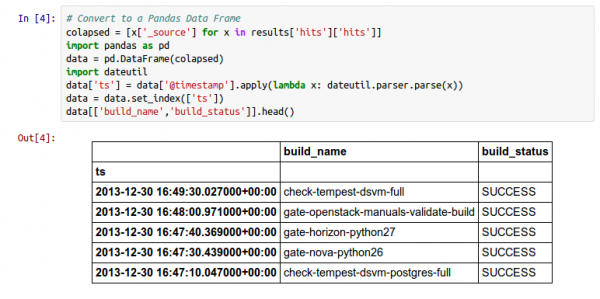
With the notebook server iPython isn't just a better interactive python shell. It's also a powerful webui, including python autocomplete. There is even good emacs integration, which includes supporting the inline graphing toolkit. Anything that's created in a cell will be available to future cells, and cells are individually executable. Looking at the example above, I'm setting up the basic json return from elastic search, which I only need to do once after starting the notebook.

Pandas is all about data series. It's really a mere mortals interface on top of numpy, with a bunch of statistics and timeseries convenience functions added in. You'll find yourself doing data transforms a lot in it. Like my college physics professors used to say, all problems are trivial in the right coordinate space. Getting there is the hard part.

With the elastic search data, a bit of massaging is needed to get the list of dictionaries that is easily convertable into a Pandas data set. In order to do interesting time series things I also needed to create a new column that was a datetime convert of @timestamp, and pivot it out into an index.

IPython notebook Pandas data series output

You also get a good glimpse of the output facilities. By default the last line of an In[] block is output to the screen. There is a nice convenience method called head() to give you a summary view (useful for sanity checking). Also, this data actually has about 20 columns, so before sanity checking I sliced it down to 2 relevant ones just to make the output easier to grok.

IPython notebook job success rate analysis

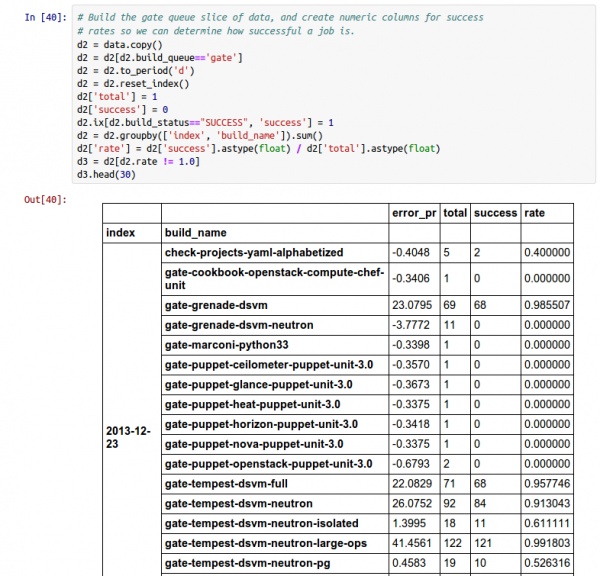
It took a couple of days to get this far. Again, this is about data transforms, and figuring out how to get from point a to point z. That might include include building and index, doing a transform on it (to reduce the resolution to day level), then resetting the index, building some computed columns, rolling everything back up in groupby clauses to compute the total number of successes and runs for each job on a certain day, and doing another computed column in this format. Here I'm also only slicing out only the jobs that didn't have a 100% success rate.

IPython notebook inline visualization of gate job data

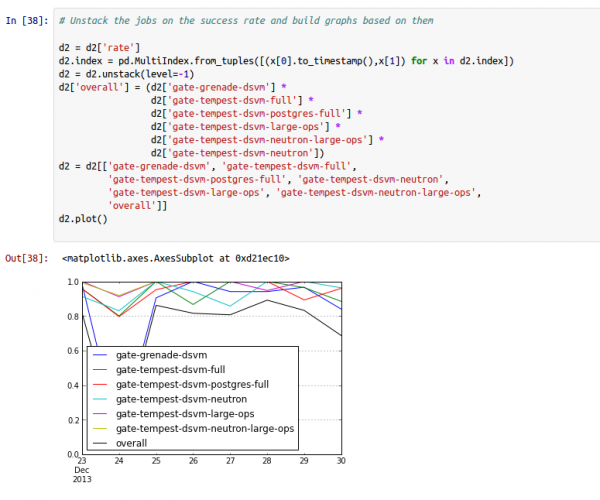
And nothing would be quite complete without being able to inline visualize data. This is the same graphs that John Dickinson was creating from graphite, except on day resolution. The data here is coming from Elastic Search so we do miss a class of failures where the console logs never make it. That difference should be small at this point.

Overall this has been a pretty fruitful experiment. Once I'm back in the saddle I'll be porting a bunch of these ideas back into Elastic Recheck itself. I actually think this will make asking the interesting follow on questions on "why does a particular job fail 40% of the time?" because we can compare it to known ER bugs, as well as figure out what our unclassified percentages look like.

For anyone that wants to play, the original iPython Notebook is no longer hosted.

Related: OpenStack Summit Preview: Elastic Recheck · 2 Gigs of Data · The future of scientific papers

Never known an open web

Recently, a lot of people that I admire and look up to have raised their voices, advocating for getting the Internet back to what it once was. An open web. A web we shared and owned together. The old web was awesome. It sure sounds awesome. Currently, our networks and our personal data are controlled by major corporations with no respect for privacy. Silicon Valley, that so-called tech hotbed of “innovation” and “disruption,” is by most reports becoming a culture of inequality and vapidity. Getting back to the founding open standards the web is, I’m told, a solution to all of this. The web should be a place where we can own our data, where our best developers focus on solving the problems we need to solve as a democratic society. An open web accepts all people and creates a culture of inclusion. Again, sounds great. As a webmaker, I want an open web. But as someone who has never experienced that, I don’t know where to begin in making it. I’m not sure simply reverting back to what we had is the right path if we want to include people who have never experienced the open web or understand its principles.

via I’m 22 years old and what is this. — Medium.

It's interesting to realize that the digital natives have basically only known a SaaS web, and how we can move forward when the expectations are that the platform is closed and controlled by a small number of interests.

Related: My own thoughts Google Chrome OS · Web Application Security · The Open CD

Moving off GMail

In early December I finally decided it was time to move my primary email out of google. There were a few reasons to do it, though the practical (reaching the limits on their filtering) largely outweighed the ideological. Movable Email If email is important to you, you should really register your own domain name, so you have a permanent address. I got dague.net back in 1999 to create a permanent home for my identity. This has meant over they years the backend for dague.net has changed at least 5 times, including me hosting it myself for a large number of years. My Requirements

  • Can host email on my own domain - as I'd be moving dague.net
  • Web UI - because sometimes I want to access my email via Chromebook
  • Good Search - because there are times I fall back to full text search to find things
  • IMAP - because most of the time I'll be accessing via Thunderbird or Kaiten Mail
  • Good spam filtering
  • Good generic filtering on the server side - My daily mail volume is north of 1000 messages (40% spam), I need good filtering otherwise I drown

Fastmail.fm I eventually landed on Fastmail.fm, who I've been watching for a lot of years. They are fairly priced ($40/yr), their company contributes back to the open source software they run their business on, and because they are actually an Australian company, you'll get disclosure if some agency is accessing your accounts. They also give you a 60 day free trial, so you can do a slow migration over, and see if it will meet your needs. Migration One I was sure I was going to do this, I created my fastmail.fm account, and then pulled and configured imapsync to sync my existing gmail content over. I have a couple of GB of email, which means an imap sync takes a good 24 hours at this point. Imapsync is rerunable, so run it once, wait until it finishes, then run it a second time, and pick up the changes. Once it seems like you've basically closed the gaps between the two accounts, you can change MX records, and start getting email at the new service provider.

For safety the first thing I do once this has happened is build a forward rule from the new provider to the old one. Then if something goes horribly wrong, all my email remains in both locations for a while. A month later I'm still running that forward, though will be disconnecting it soon. So far so good The webmail for fastmail is really solid, honestly I like it better than gmail's web ui, which has become incredibly cluttered over the years. This is just email, which is good. It also has a search facility which is on par with google's. It's also available as part of the IMAP protocol, which means real searching from Kaiten mail on Android. Switching from GMail App to Kaiten Mail on my phone was about 10 minutes. And it means I can actually customize things I get alerted to, which gmail broken at some point. Thunderbird transition was simple.

I had gotten used to Raportive on gmail that would give me people's pictures on their email. I found the Ldap Info Show extension on Thunderbird, which looks people up on various social networks, and gives you pictures they have public. Lacking APIs The one complaint I have with fastmail, is that it's lacking APIs to handle your data. For instance, my filtering rules are complex. 342 lines of sieve and counting at this point. This is managed via a web form, but copy / paste on every change is something I'm not really into. I solved this by writing a python mechanize sync script so I can manage the rules locally, version controlled, then sync them up afterwards.

Address book has some issues, and I've not built a work around. The sieve rules they give you whitelist your address book as spam sources, so it's something I'd like to keep in sync. However, without an API it's not really worth it. Overall: Very Good Overall I'm very happy with the move. My biggest complaints are around the API issue, which I hope they correct in the future.

Related: Migration to Google Email · Syncing Sieve Rules in Fastmail, the hard way · Hello Thunderbird

Planet Money T-Shirt Project

If you haven't been following along: Planet Money has been making a t-shirt, and working to follow it's creation throughout the global supply chain. This has led to a ton of podcast episodes that trace that path, cradle to grave.

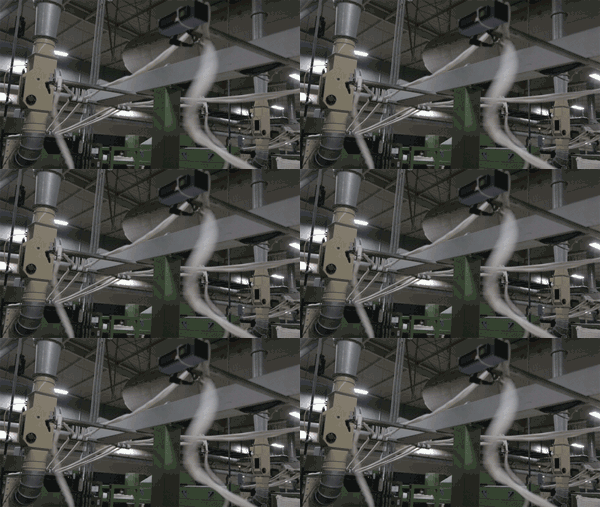
Planet Money T-Shirt — spinning yarn

They also have this really great mixed media summary of the whole story, which includes a look at everything from the raw cotton, to the process of getting the shirt to you. Including great video of the machines used along the way.   On this Christmas Eve take a minute to follow something as simple as a t-shirt through the global economy, and realize how connected we are, even through seemingly everyday things.

Related: Easy Planet 1.1 released · Our Planet · What I'm listening to