Writings

Technology, open source, personal essays, and everything that isn't climate.

If you take credit cards, you don't just sell hammers

Several former Home Depot employees said they were not surprised the company had been hacked. They said that over the years, when they sought new software and training, managers came back with the same response: “We sell hammers.” via Ex-Employees Say Home Depot Left Data Vulnerable - NYTimes.com.

This NY Times piece on Home Depot's giant data breach pairs pretty well with the recent opening of a Planet Money episode on data security: Episode 568: Snoops, Hackers And Tin Foil Hats:

"One thing we've learned is the hackers always win. If what you do is have a lot of really valuable information in one place, and you try to secure it, you are going to lose."

  • Moxie Marlinspike, TextSecure
Related: NYTimes: Who owns that science data · Home Assistant · Things we sometimes forget

My IRC proxy setup

IRC (Internet Relay Chat) is a pretty important communication medium for a lot of Open Source projects nowadays. While email is universal and lives forever, IRC is the equivalent of the hallway chat you'd have with a coworker to bounce ideas around. IRC has the advantage of being a reasonably simple and open (and old) protocol, so writing things that interface with it is about as easy as email clients. But, it has a pretty substantial drawback: you only get messages when you are connected to the channels in question.

Again, because it's an open protocol this is actually a solvable problem, have a piece of software on an always on system somewhere that remains connected for you. There are 2 schools of thinking here:

  • Run a text IRC client in screen or tmux on a system, and reconnect to the terminal session when you come in. WeeChat falls into this camp.
  • Run an irc proxy on a server, and have your IRC client connect to the proxy which replays all the traffic since the last time you were connected. Bip, ZNC, and a bunch of others fall into this camp.

I'm in Camp #2, because I find my reading comprehension of fixed width fonts is far less than variable width ones. So I need my IRC client to be in a variable width font, which means console solutions aren't going to help me.

ZNC

ZNC is my current proxy of choice. I've tried a few others, and dumped them for reasons I don't entirely remember at this point. So ZNC it is.

I have a long standing VPS with Linode to host a few community websites. For something like ZNC you don't need much horse power and could use cloud instances anywhere. If you are running debian or ubuntu in this cloud instance: apt-get install znc gets you rolling.

Run ZNC from the command line and you'll get something like this: znc fail That's because first time up it needs to create a base configuration. Fortunately it's pretty straight forward what that needs to be.

znc --makeconf takes you through a pretty interactive configuration screen to build a base configuration. The defaults are mostly fine. The only thing to keep in mind is what port you make ZNC listen on, as you'll have to remember to punch that port open on the firewall/security group for your cloud instance.

I also find the default of 50 lines of scrollback to be massively insufficient. I usually bounce that to 5000 or 10000.

Now connect your client to the server and off you go. If you have other issues with basic ZNC configuration, I'd suggest checking out the project website.

ZNC as a service

The one place ZNC kind of falls down is that out of the box (at least on ubuntu) it doesn't have init scripts. Part of this is because the configuration file is very user specific, and as we say by the interactive mode, is designed around asking you a bunch of questions. That means if your cloud instance reboots, your ZNC doesn't come back.

I fixed this particular shortcoming with Monit. Monit is a program that monitors other programs on your system and starts or restarts them if they have faulted out. You can apt-get install it on debian/ubuntu.

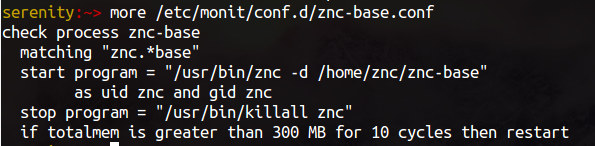
Here is my base znc monit script: znc monit Because znc doesn't do pid files right, this just matches on a process name. It has a start command which includes the user / group for running this, and a stop command, and some out of bounds criteria. All in a nice little dsl.

All that above will get you a basic ZNC server running, surviving cloud instance reboots, and make sure you never miss a minute of IRC.

But... what if we want to go further.

ZNC on ZNC

The idea for this comes from Dan Smith, so full credit where it is due.

If you regularly connect to IRC from more than one computer, but only have 1 ZNC proxy setup, the issue is the scrollback gets replayed to the first computer that connects to the proxy. So jumping between computers to have conversations ends up being a very fragmented experience.

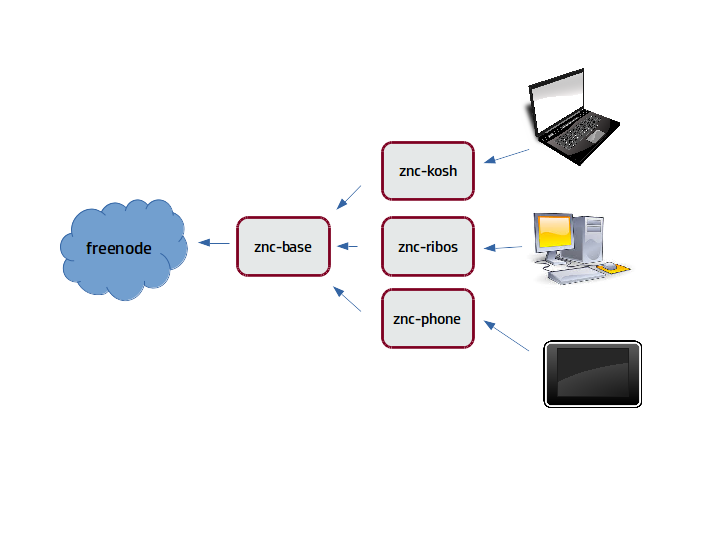
ZNC presents as just an IRC Server to your client. So you can layer ZNC on top of ZNC to create independent scrollback buffers for every client device. My setup looks something like this: ZNC on ZNC Which means that all devices have all the context for IRC, but I'm only presented as a single user on the freenode network.

Going down this path requires a bit more effort, which is why I’ve got the whole thing automated with puppet. You’ll need to write a puppet module for znc, but hopefully this description provides a good starting point.

IRC on Mobile

Honestly, the Android IRC experience is... lacking. Most of the applications out there that do IRC on Android provide an experience which is very much a desktop experience, which works poorly on a small phone. Monty Taylor pointed me at IRCCloud which is a service that provides a lot of the same offline connectivity as the ZNC stack provides. They have a webui, and an android app, which actually provides a really great mobile experience. So if Mobile is a primary end point for you, it's probably worth checking out.

IRC optimizations for the Desktop

In the one last thing category, I should share the last piece of glue that I created.

I work from home, with a dedicated home office in the house. Most days I'm working on my desktop. I like to have IRC make sounds when my nick hits, mostly so that I have some awareness that someone wants to talk to me. I rarely flip to IRC at that time, it just registers as a "will get to it later" so I can largely keep my concentration wherever I'm at.

That being said, OpenStack is a 24hr a day project. People ping me in the middle of the night. And if I'm not at my computer, I don't want it making noise. Ideally I'd even like them to see me as 'away' in IRC.

Fortunately, most desktop software in Linux integrates with a common messaging bus: dbus. The screensaver in Ubuntu emits a signal on lock and unlock. So I created a custom script that mutes audio on screen lock, unmutes it on screen unlock, as well as sends 'AWAY' and 'BACK' commands to xchat for those state transitions.

You can find the script as a gist.

So... this was probably a lot to take in. However, hopefully getting an idea of what an advanced IRC workflow looks like will give folks ideas. As always, I'm interested in hearing about other things people have done. Please leave a comment if you've got an interesting productivity hack around IRC.

Related: Staying connected while you are away, using an IRC Proxy · Yet more fun with RSS, rssbot · Communication in 2019

OpenStack as Layers

Last week at LinuxCon I gave a presentation on DevStack which gave me the proper excuse to turn an idea that Dean Troyer floated a year ago about OpenStack Layers into pictures (I highly recommend reading that for background, I won't justify every part of that here again). This abstraction has been something that's actually served us well as we think about projects coming into DevStack. OpenStack_Layers Some assumptions are made here in terms of what essential services are here as we build up the model.
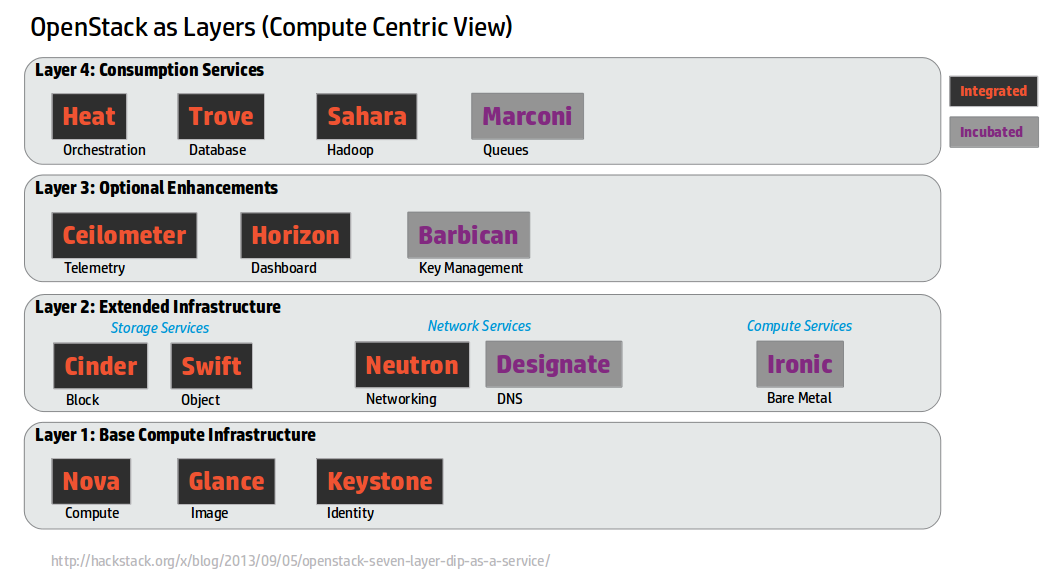
Layer 1: Base Compute Infrastructure

We assume that compute infrastructure is the common starting point of minimum functional OpenStack that people are deploying. The output of the last OpenStack User Survey shows that the top 3 deployed services, regardless of type of cloud (Dev/Test, POC, or Production) are Nova / Glance / Keystone. So I don't think this is a huge stretch. There are definitely users that take other slices (like Swift only) but compute seems to be what the majority of people coming to OpenStack seem to be focussed on.

Basic Compute services need 3 services to get running. Nova, Glance, and Keystone. That will give you a stateless compute cloud which is a starting point for many people getting into the space for the first time.

Layer 2: Extended Infrastructure

Once you have a basic bit of compute infrastructure in place, there are some quite common features that you do really need to do more interesting work. These are basically enhancements on the Storage, Networking, or Compute aspects of OpenStack. Looking at the User Survey these are all deployed by people, in various ways, at a pretty high rate.

This is the first place we see new projects integrating into OpenStack. Ironic extends the compute infrastructure to baremetal, and Designate adds a missing piece of the networking side with DNS management as part of your compute creation.

Hopefully nothing all that controversial here.

Layer 3: Optional Enhancements

Now we get a set of currently integrated services that integrate North bound and South bound. Horizon integrates on the North bound APIs for all the services, it requires service further down in layers (it also today integrates with pieces further up that are integrated). Ceilometer consumes South bound parts of OpenStack (notifications) and polls North bound interfaces.

From the user survey Horizon is deployed a ton. Ceilometer, not nearly as much. Part of this is due to how long things have been integrated, but even if you do analysis like take the Cinder / Neutron numbers, delete all the Folsom deploys from it (which is the first time those projects were integrated) you still see a picture where Ceilometer is behind on adoption. Recent mailing list discussions have hints at why, including some of the scaling issues, and a number of alternative communities in this space.

Let's punt on Barbican, because honestly, it's new since we came up with this map, and maybe it's really a layer 2 service.

Layer 4: Consumption Services

I actually don't like this name, but I failed to come up with something better. Layer 4 in Dean's post was "Turtles all the way down", which isn't great describing things either.

This is a set of things which consume other OpenStack services to create new services. Trove is the canonical example, create a database as a service by orchestrating Nova compute instances with mysql installed in them.

The rest of the layer 4 services all fit the same pattern, even Heat. Heat really is about taking the rest of the components in OpenStack and building a super API for their creation. It also includes auto scaling functionality based on this. In the case of all integrated services they need a guest agent to do a piece of their function, which means when testing them in OpenStack we don't get very far with the Cirros minimal guest that we use for Layer 3 and down.

But again, as we look at the user survey we can see deployment of all of these Layer 4 services is lighter again. And this is what you'd expect as you go up these layers. These are all useful services to a set of users, but they aren't all useful to all users.

I'd argue that the confusion around Marconi's place in the OpenStack ecosystem comes with the fact that by analogy it looks and feels like a Layer 4 service like Trove (where a starting point would be allocating computes), but is implemented like a Layer 2 one (straight up raw service expected to be deployed on bare metal out of band). And yet it's not consumable as the Queue service for the other Layer 1 & 2 services.

Leaky Taxonomy

This is not the end all be all of a way to look at OpenStack. However, this layered view of the world confuses people a lot less than the normal view we show them -- the giant spider diagram (aka the mandatory architecture slide for all OpenStack presentations): OpenStack_Spider_Diagram This picture is in every deep dive on OpenStack, and scares the crap out of people who think they might want to deploy it. There is no starting point, there is no end point. How do you bite that off in a manageable chunk as the spider grows?
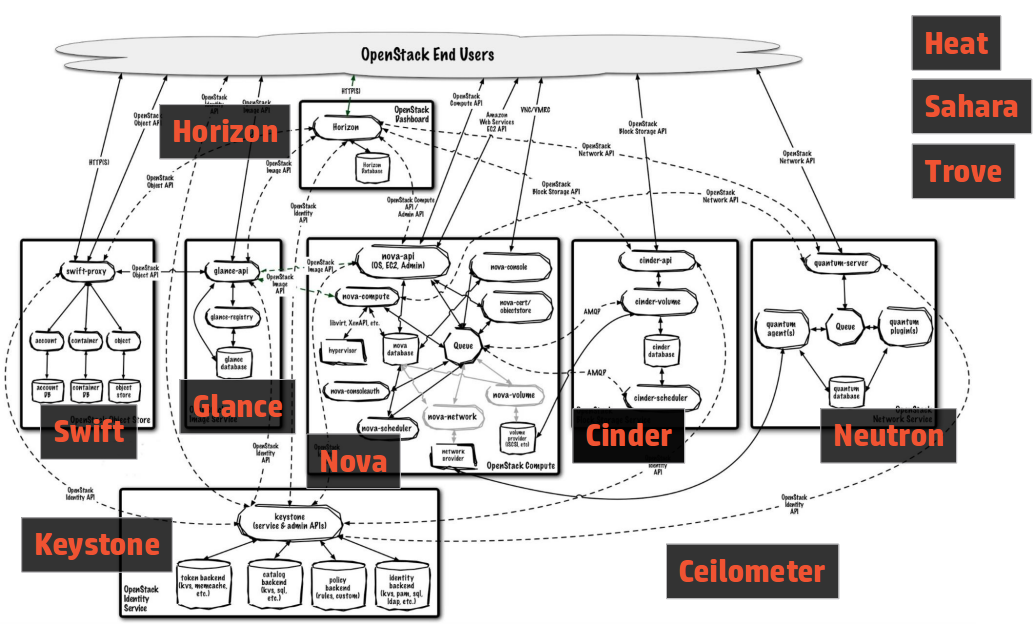
I had one person come up to me after my DevStack talk giving a big thank you. He'd seen a presentation on Cloudstack and OpenStack previously and OpenStack's complexity from the outside so confused him that he'd run away from our community. Explaining this with the layer framing, and showing how you could experiment with this quickly with DevStack cleared away a ton of confusion and fear. And he's going to go dive in now.

Tents and Ecosystems

Today the OpenStack Technical Committee is in charge of deciding the size of the "tent" that is OpenStack. The approach to date has been a big tent philosophy, where anything that's related, and has a REST API, is free to apply to the TC for incubation.

But a big Tent is often detrimental to the ecosystem. A new project's first goal often seems to become incubated, to get the gold star of TC legitimacy that they believe is required to build a successful project. But as we've seen recently a TC star doesn't guarantee success, and honestly, the constraints on being inside the tent are actually pretty high.

And then there is a language question, because OpenStack's stance on everything being in Python is pretty clear. An ecosystem that only exists to spawn incubated projects, and incubated projects only being allowed to be in Python, basically means an ecosystem devoid of interesting software in other languages. That's a situation that I don't think any of us want.

So what if OpenStack were a smaller tent, and not all the layers that are in OpenStack today were part of the integrated release in the future? Projects could be considered a success based on their users and usage out of the ecosystem, and not whether they have a TC gold star. Stackforge wouldn't have some stigma of "not cool enough", it would be the normal place to exist as part of the OpenStack ecosystem. Mesos is an interesting cloud community that functions like that today. Mesos has a small core framework, and a big ecosystem. The smaller core actually helps grow the ecosystem by not making the ecosystem 2nd class citizens. I think that everyone that works on OpenStack itself, and all the ecosystem projects, want this whole thing to be successful. We want a future with interoperable, stable, open source cloud fabric as a given. There are lots of thoughts on how we get there, and as no one has ever created a universal open source cloud fabric that lets users have the freedom to move between providers, public and private, so it's no surprise that as a community we haven't figured everything out yet.

But here's another idea into the pool, under the assumption that we are all smarter together with all the ideas on the table, than any of us are on our own.

Related: The OpenStack Gate · OpenStack Failures · OpenStack Infrastructure Bootcamp

Splitting up Git Commits

Human review of code takes a bunch of time. It takes even longer if the proposed code has a bunch of unrelated things going on in it. A very common piece of review commentary is "this is unrelated, please put it in a different patch". You may be thinking to yourself "gah, so much work", but turns out git has built in tools to do this. Let me introduce you to git add -p.

Lets look at this Grenade review - https://review.openstack.org/#/c/109122/1. This was the result of a days worth of hacking to get some things in order. Joe correctly pointed out there was at least 1 unrelated change in that patch (I think he was being nice, there were probably at least 4 things going that should have been separate). Those things are:

  • The quiece time for shutdown, that actually fixes bug 1285323 all on it's own.
  • The reordering on the directory creates so it works on a system without /opt/stack
  • The conditional upgrade function
  • The removal of the stop short circuits (which probably shouldn't have been done)

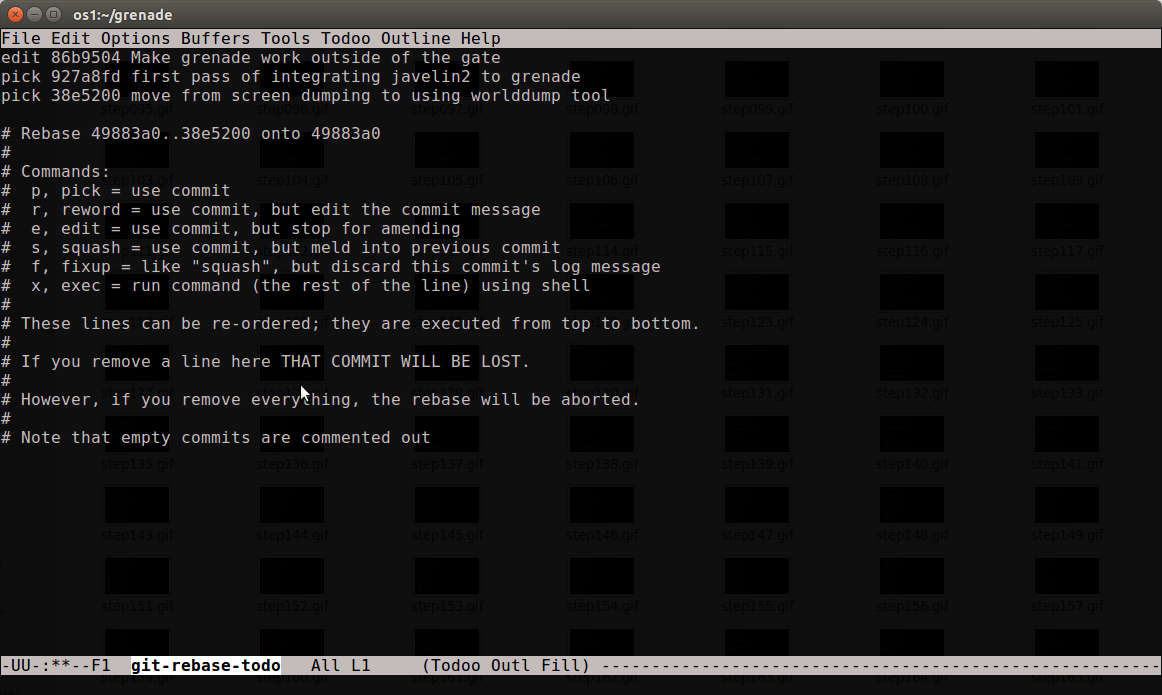
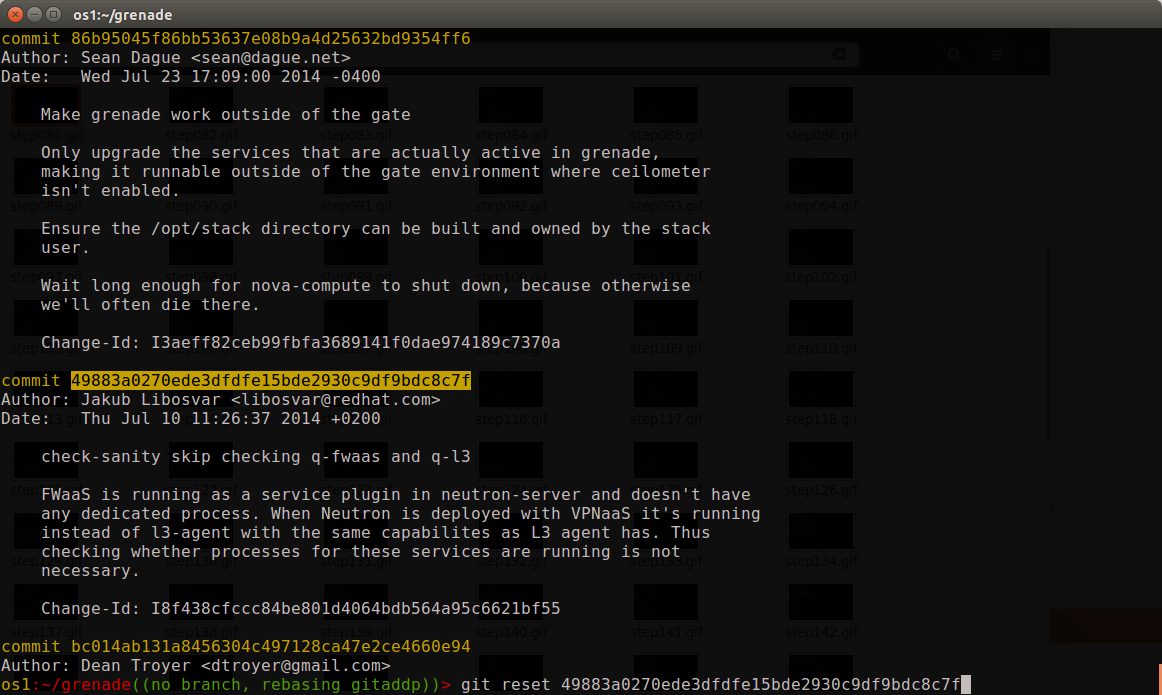
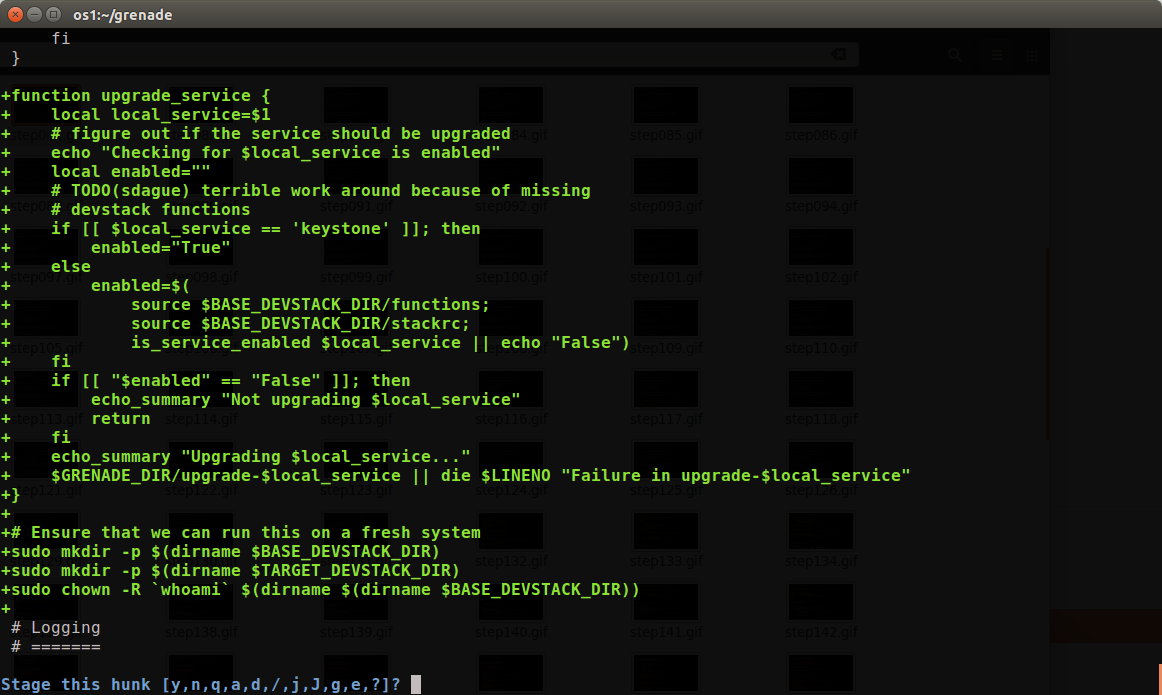
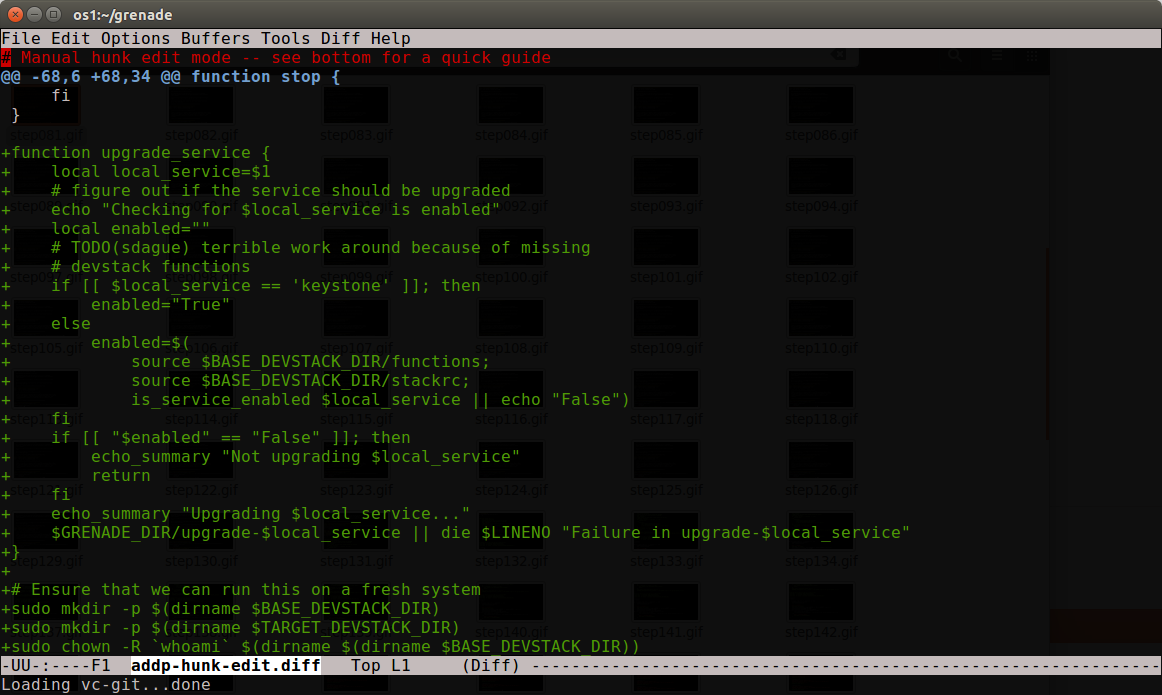
So how do I turn this 1 patch, which is at the bottom of a patch series, into 3 patches, plus drop out the bit that I did wrong? Step 1: rebase -i master Start by running git rebase -i master on your tree to put myself into the interactive rebase mode. In this case I want to be editing the first commit to split it out. screenshot_171 Step 2: reset the changes git reset ##### will unstage all the changes back to the referenced commit, so I'll be working from a blank slate to add the changes back in. So in this case I need to figure out the last commit before the one I want to change, and do a git reset to that hash. screenshot_173 Step 3: commit in whole files Unrelated change #1 was fully isolated in a whole file (stop-base), so that's easy enough to do a git add stop-base and then git commit to build a new commit with those changes. When splitting commits always do the easiest stuff first to get it out of the way for tricky things later. Step 4: git add -p In this change grenade.sh needs to be split up all by itself, so I ran git add -p to start the interactive git add process. You will be presented with a series of patch hunks and a prompt about what to do with them. y = yes add it, n = no don't, and lots of other options to be trickier. screenshot_176 In my particular case the first hunk is actually 2 different pieces of function, so y/n isn't going to cut it. In that case I can type 'e' (edit), and I'm dumping into my editor staring at the patch, which I can interactively modify to be the patch I want. screenshot_177 I can then delete the pieces I don't want in this commit. Those deleted pieces will still exist in the uncommitted work, so I'm not losing any work, I'm just not yet dealing with it. screenshot_178 Ok, that looks like just the part I want, as I'll come back to the upgrade_service function in patch #3. So save it, and final all the other hunks in the file that are related to that change to add them to this patch as well. screenshot_179 Yes, to both of these, as well as one other towards the end, and this commit is ready to be 'git commit'ed.
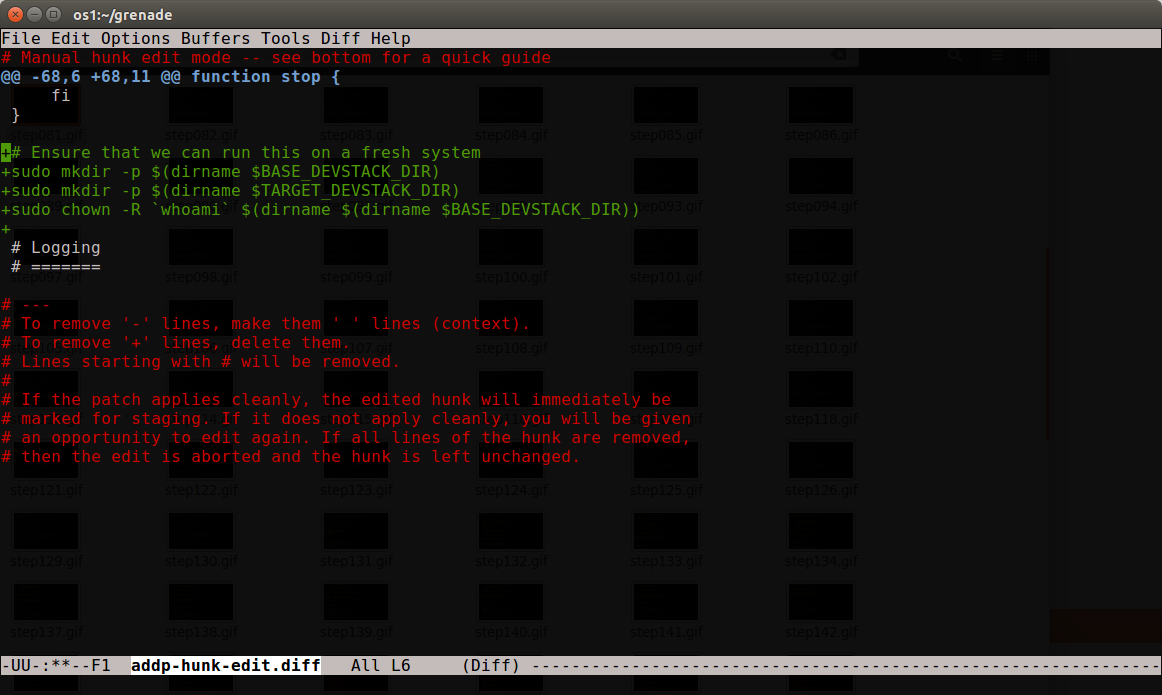
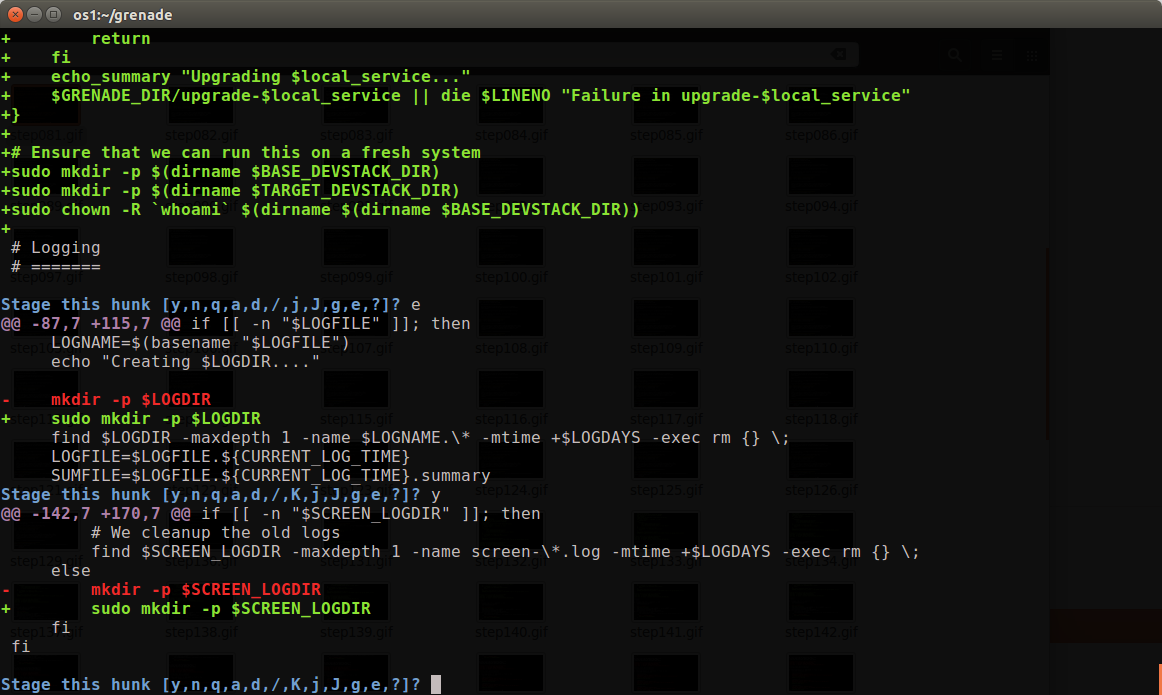
Now what's left is basically just the upgrade_service function changes, which means I can git add grenade.sh as a whole. I actually decided to fix up the stop calls before doing that just by editing grenade.sh before adding the final changes. After it's done, git rebase --continue rebases the rest of the changes on this, giving me a new shiney 5 patch series that's a lot more clear than the 3 patch one I had before. Step 5: Don't forget the idempotent ID One last important thing. This was a patch to gerrit before, which means when I started I had an idempotent ID on every change. In splitting 1 change into 3, I added that id back to patch #3 so that reviewers would understand this was an update to something they had reviewed before. It's almost magic As a git user, git add -p is one of those things like git rebase -i that you really need in your toolkit to work with anything more than trivial patches. It takes practice to have the right intuition here, but once you do, you can really slice up patches in a way that are much easier for reviewers to work with, even if that wasn't how the code was written the first time.

Code that is easier for reviewers to review wins you lots of points, and will help with landing your patches in OpenStack faster. So taking the time upfront to get used to this is well worth your time.

Related: A Git epiphany, a journey in 3 acts · One step deployment of rails applications with git and passenger · OpenSim moves to git

OpenStack Failures

Last week we had the bulk of the brain power of the OpenStack QA and Infra teams all in one room, which gave us a great opportunity to spend a bunch of time diving deep into the current state of the Gate, figure out what's going on, and how we might make things better.

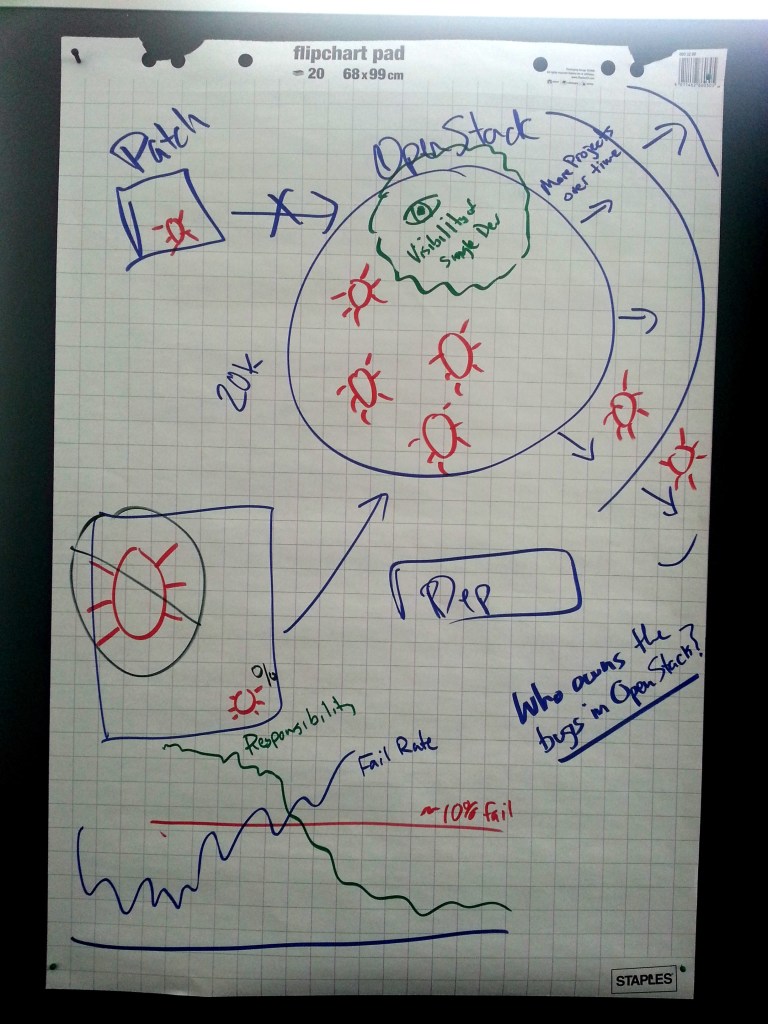
Over the course of 45 minutes we came up with this picture of the world. 14681027401_327a720647_o We have a system that's designed to merge good code, and keep bugs out. The problem is that while it's doing a great job of keeping big bugs out, subtle bugs, ones that are low percentage (like show up in only 1% of test runs) can slip through. These bugs don't go away, they instead just build up inside of OpenStack.


As OpenStack expands in scope and function, these bugs increase as well. They might grow or shrink based on seemingly unrelated changes, dependency changes (which we don't gate on), timing impacts by anything in the underlying OS.

As OpenStack has grown no one has a full view of the system any more, so even identifying that a bug might or might not be related to their patch is something most developers can't do. The focus of an individual developer is typically just wanting to land their code, not diving into the system as a whole. This might be because they are on a schedule, or just that landing code feels more fun and productive, than digging into existing bugs.

From a social aspect we seem to have found that there is some threshold failure rate in the gate that we always return to. Everyone ignores base races until we get to that failure rate, and once we get above it for long periods of time, everyone assumes fixing it is someone else's responsibility. We had an interesting experiment recently where we dropped 300 Tempest tests in turning off Nova v3 by default, which gave us a short term failure drop, but within a couple months we're back up to our unpleasant failure rate in the gate.

Part of the visibility question is also that most developers in OpenStack don't actually understand how the CI system works today, so when it fails, they feel powerless. It's just a big black box blocking their code, and they don't know why. That's incredibly demotivating. Towards Solutions Every time the gate fail rates get high, debates show up in IRC channels and on the mailing list with ideas to fix it. Many of these ideas are actually features that were added to the system years ago. Some are ideas that are provably wrong, like autorecheck, which would just increase the rate of bug accumulation in the OpenStack code base.

A lot of good ideas were brought up in the room, over the next week Jim Blair and I are going to try to turn these into something a little more coherent to bring to the community. The OpenStack CI system tries to be the living and evolving embodiment of community values at any point in time. One of the important things to remember is those values aren't fixed points either.

The gate doesn't exist to serve itself, it exists because before OpenStack had one, back in the Diablo days, OpenStack simply did not work. HP Cloud had 1000 patches to Diablo to be able to put it into production, and took 2 years to migrate from it to another version of OpenStack.

Related: The OpenStack Gate · OpenStack Havana - the Quality Perspective · OpenStack as Layers

Facebook's Experiment

The internet is currently a fury on Facebook's paper where they spent 1 week in 2012 an manipulated 0.1% of their users feeds to have them see more positive or more negative than average posts, and see what they produced in return. And they published the results here. A very solid summary at the Atlantic. screenshot_170 This outrage seems a little odd, in contrast to the Freemium game explosion, which is all about being as brutally manipulative as possible to make you buy in app upgrades. Candy Crush basically is actively exploiting the same human weaknesses that creates gambling addiction. If we want to talk about ethics in computing right now, Freemium is something we need to have a very serious conversation about.

The study highlights how your filter bubble impacts your mood. If you are exposed to more positive content, you end up more positive. If you are exposed to more negative content, you end up more negative. Not by huge margins, but by noticable ones. Who you are is impacted by what you emotionally ingest. It shouldn't be a surprising idea, but it does take something like Facebook to be able to measure the effect with enough controls to make sure it's real.

If seeing a few minutes a day of more positive or negative content impacts your mood enough to get a reaction out of you, what else impacts it? Home; Work; Friends; Media. And what hacks can you do to impact it yourself.

Related: The Mood of a Nation · Failure to avoid Facebook · Facebook. Sigh.

The Lawn at Tanglewood

Last night we took in Tanglewood as lawn ticket holders for the first time. I'm always properly amazed at the complex picnicking that people do for these events. The image below is a panorama of last night, which you can move your mouse across left to right to see the whole thing. Especially the green folding picnic table with the Botobox a little bit right of center.

Panorama of the Tanglewood lawn, June 2014

Panorama of the Tanglewood lawn, June 2014

After this experience I think the lawn is definitely for us. Much more comfortable seating, and the ability to bring your own food and drink is really great.
Related: Honeymoon Update · Trains and complexity · An incredible night of observing

Processing OpenStack GPG keys in Thunderbird

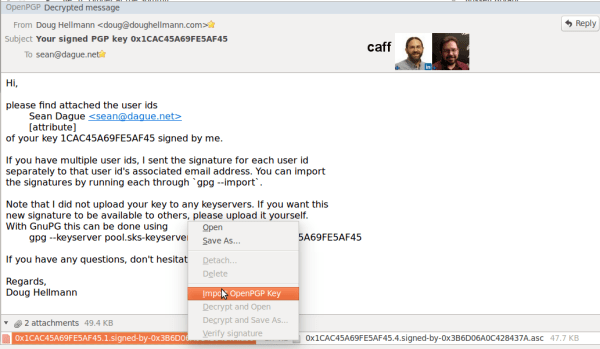
If you were part of the OpenStack keysigning party from the summit, you are currently probably getting a bunch of emails sent by caff. This is an easy way to let a key signer send you your signed key.

These are really easy to process if you are using Thunderbird + Enigmail as your signed/encrypted mail platform. Just open up the mail attachments, right click, and import key: screenshot_161 Once you've done this you'll have included the signature in your local database. Then from the command line you can:
gpg --send-key YOURKEYID

And then you are done. Happy GPGing!

Related: Hello Thunderbird · The Thunderbird Paradox · How an Idea becomes a Commit in OpenStack

OpenStack Summit Preview: Elastic Recheck

With OpenStack summit only a few days away, I've been preparing materials for my Elastic Recheck talk. Elastic Recheck is a system that we built over the last 7 months to help us data mine failures in test results in the OpenStack test system to find patterns.

The Problem

OpenStack is a complicated system, with lots of components working in an asynchronous way. This means that small timing changes can often expose some interesting issues. This is especially true in an environment like the upstream gate where we are running tests in parallel.

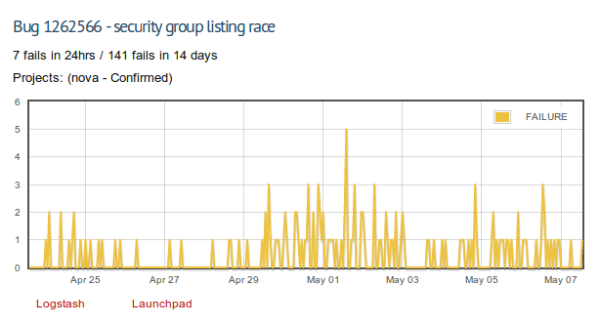
A good example of this is a currently open bug. If you run a security group list against all tenants at the same time someone is deleting a security group, the listing returns a 404. This is because of a nesting behavior in the list, which includes running a db get over all the items in the list to get additional details. There is an exposure window there where a security group is in the list, it's deleted by another user, then we go back to get it, and it fails. That failure currently propagates a set of exceptions which become a 404 to the end user. Which is totally unexpected.

That window seems really small, right? Like it never could actually happen. Well, in the gate, even with only 2 - 4 API calls happening at a time, we see this 7 times a day: Security Group Listing

The Solution

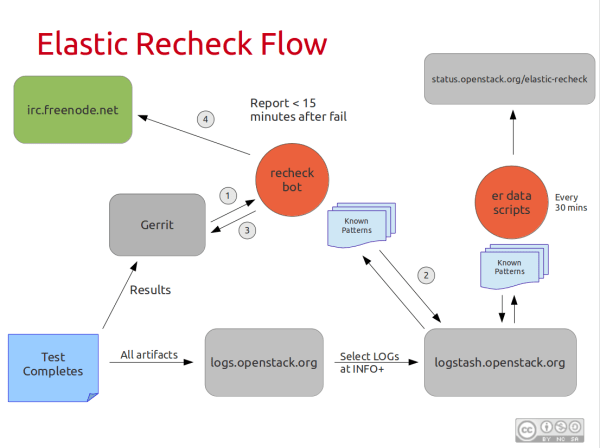
Starting during the Havana RC phase, we started turning this into a search problem. Using logstash and elastic search on the back end, we find fingerprints for known bugs. These fingerprints are queries that will give us back only test runs which seem to have failed on this particular bug.

The system includes real time reporting to Gerrit and IRC when we detect that a job failed with a known issue, and bulk reporting every 30 minutes to let us understand trends and classification rates. Elastic Recheck Flow Overall this has been a huge boon towards really identifying some of the key issues we expose during normal testing. What's also been really interesting is having a system like this impacts the way that people write core project code, so that errors are more uniquely discoverable. Which is a win not only for our detection, but for debugging OpenStack in a production environment.

Learning More

If you are going to be in Atlanta, and would like to know more, you'll have lots of opportunities. My summit talk, which is going to be overview intended for people that want to learn more about the project and technique.

Elastic Recheck - Tools for Finding Race Conditions in OpenStack

Date: Thursday, May 15th Time: 2:20pm Room: B206 Track: Related Open Source Projects

We'll also be doing a design summit session for people that are interested in contributing to the project, and helping us set priorities for the next cycle. Wed, 9:50am in the Infrastructure Track.

Also, feel free to find me anywhere to chat about Elastic Recheck. I'm always happy to talk about it, especially if you are interested in getting involved in the effort.

I believe the summit talk will be recorded, and I'll post links to the video once it's online for people that can't make it to Atlanta.

Related: The OpenStack Gate · OpenStack Failures · OpenStack Havana - the Quality Perspective